13 -
For information on the “DDS” tester, refer to Sect. 6 - 13, DDS diagnosis instrument.
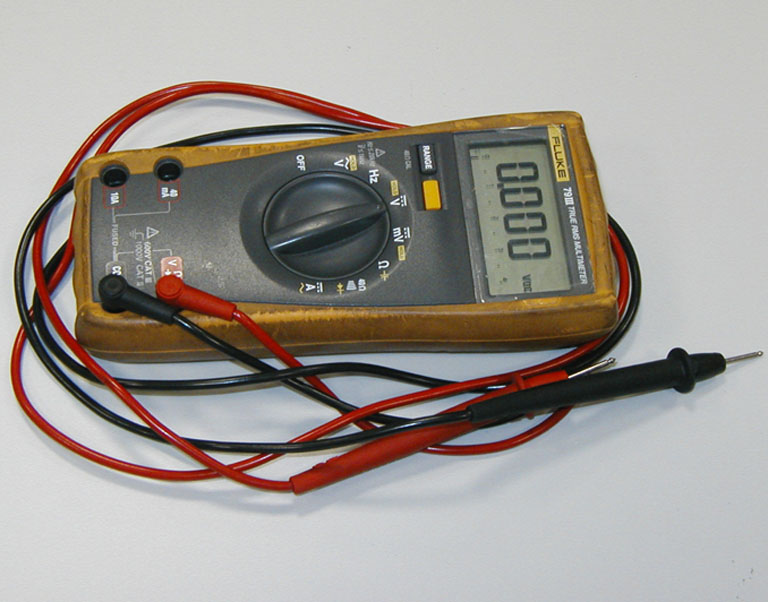
Using a multimeter to check the electrical systems
Introduction
This instrument allows you to measure resistance, voltages, and current values. Multimeters can be divided into two basic types: those with an analogue display and those with a digital display. Units of the first type are equipped with a dial and needle. The dial is marked with the scales to be used for measurement of the various parameters. Digital units are equipped with a dial that displays numbers corresponding to the values of the measured parameters. The type of measurement to be carried out (voltage, current or resistance) is set by means of a selector or by means of several different sockets in which to insert the two test probe connector terminals. In certain cases it is essential to set the full scale value before proceeding. For example, in order to measure a 12 V signal, you need to set a full scale that is close to this value (e.g. 15 V or 20 V). It would be illogical to set a full scale value of 10 V; the same applies when setting current (Amperes) or resistance (Ohms). Sometimes the instrument can set the required full scale value automatically. Never exceed the maximum value allowed by the tester when measuring voltage or current signals.
Note
The DDS diagnosis instrument (Sect. 6 - 13, DDS diagnosis instrument) can fulfil the function of digital multimeter.
Voltage measurement
Voltage measurements must be carried out by connecting the terminals of the tester in parallel to the load (e.g. to the wires feeding a light bulb or a relay, the two battery terminals, or the two wires supplying power to a control unit). Voltages can be constant over time (DC voltage) or variable over time (AC voltage). In the first case, it is important to consider the negative and positive polarity of the application. It is therefore necessary to select on the multimeter the type of voltage you intend to measure. (DC voltage is shown by the symbol = while AC voltage is denoted by ~).
Current measurement
Current measurements must be made by connecting the multimeter terminals in series with the load (e.g. disconnect one of the wires feeding power to a light bulb and connect one terminal of the multimeter to the free end of wire and the other terminal to the light bulb. When the lights switch is set to ON, the bulb will illuminate normally and the tester will show the absorbed current, i.e. the amount of current passing through the wire. Warning: connections in series must be made and removed only when the power is switched off. Never attempt to make or break a series connection when a device is powered. Always make sure that the connection in series of the tester terminals on the electrical device is made is a safe manner in such a way that it cannot be broken accidentally.
Measurement of resistance values and electrical continuity
Resistance measurements must be taken only when the electrical device or section of the circuit is not powered and isolated from the main electric system (i.e. not connected to the main electric system). These measurements can be utilised to check the resistance value across several sensors. For example, after disconnecting the electrical wiring to the rpm/ignition-injection system timing sensor (on the camshaft drive gear) the relative internal resistance can be checked by connecting a multimeter to its terminals. This makes it possible to check the electrical continuity of the winding inside the sensor (a reading of infinite resistance indicates that the winding is interrupted). Resistance measurement can also be used to check the continuity of sections of the electrical circuit or relay type switches. For example, to check the condition of a section of the electrical circuit between two connections, disconnect the connections and connect the terminals of the multimeter to the ends of the electrical cable in question to check that the specified resistance value is present. If this value is close to zero (i.e. lower than approximately 0.3 ohm) this means that the cable is not interrupted. Some instruments feature an audible signal that is emitted when the resistance approaches a value of zero. The same procedure must be adopted to check whether, for example, two contacts of a switch (relay or manual type) are making the contact correctly when closed. In this case the terminals of the multimeter must be connected to the switch terminals, checking that the resistance value is close to zero (or listening for the audible signal) when the switch is closed. To check that the multimeter is functioning correctly in “electrical continuity test” mode, short out the two test probes. The resistance value indicated must be almost nil and the audible signal must be activated.
Protections and precautions
The multimeter is equipped with protective fuses and batteries. These components must always be in perfect condition to ensure that the instrument is functioning correctly. When making electrical measurements always use the maximum caution to avoid short circuits, which can otherwise cause irreparable damage to the electric system and constitute a personal injury hazard. All maintenance work must be performed exclusively when the system is not live (disconnect the battery in advance). NEVER connect the multimeter in parallel to make current measurements, and NEVER connect it in series to carry out voltage measurements.
Description of the Ducati Diagnostic System tester
The “DDS” diagnostic system lets you diagnose any faults in the injection-ignition system via a serial port. The system is also equipped with functions to test various devices on the motorcycle. The DDS diagnosis instrument can be used to measure current and voltage on any electrical device, to perform tests on individual components and to measure pressure and temperature values.
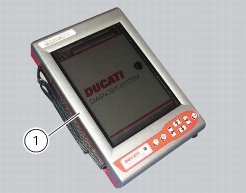
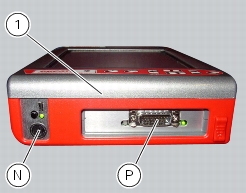
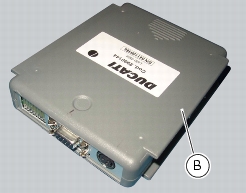
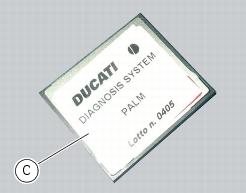
The DDS diagnosis instrument (1) tool code 97900.0215 comprises a palmtop display unit (A), a BBAD self-diagnosis module (B) and a display memory card (C).
The touch-screen display unit (A) serves for both data display and input, using the stylus housed on the side of the unit.
The self-diagnosis module (B) enables communication between the DDS diagnosis instrument (1) and the motorcycle’s on-board electronic control unit (ECU).
The user interface software resides in the display memory card (C) which is housed in the Palmtop display unit (A).
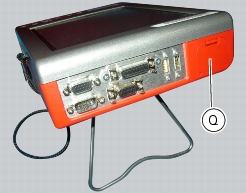
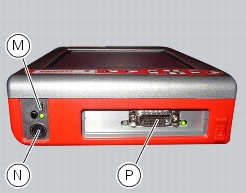
The display unit is equipped with two connection panels: one at the top of the instrument and one at the bottom.
The top connection panel has 6 connection sockets with the following functions:
-
-
-
-
-
The bottom connection panel has 3 connection sockets with the following functions:
-
-
-
You can connect a printer to the DDS diagnosis instrument (1) to print test reports: connect the printer to the serial port (COM1) (G) located on the top connection panel of the tester (1).
Technical data
Power supply:
-
from the mains – 220 V;
-
Components supplied with the DDS diagnosis instrument
The DDS diagnosis instrument (1) is supplied in a kit together with the following items:
-
-
-
-
-
-
-
-
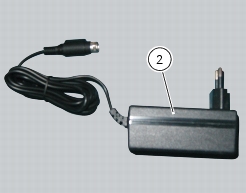
Tester power supply
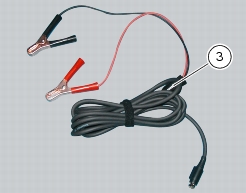
The DDS diagnosis instrument (1) tool part no. 97900.0215 may be powered in any of the following ways:
-
-
-
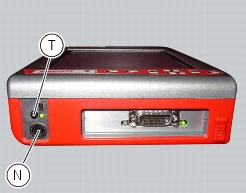
from the tester's internal battery: the battery (Q) is housed in the top part of the tester. To operate the tester (1) using the internal battery and to recharge the battery, refer to the “User Manual” supplied with the DDS diagnosis instrument.
To switch on the display, press the button (T).
Connection to the motorcycle
The tester requires a power supply voltage within 9 and 16 Volts D.C.
Make sure voltage never drops below this limit during operation: this situation could occur during engine starting and idling on motorcycles in which the battery is not in perfect working order. If the tester detects a power supply voltage lower than 9 Volts, the current procedures will be reset; when the voltage returns to the acceptable tolerance limits the procedure must start again from the beginning.
The DDS diagnosis instrument (1) may be powered from the motorcycle in any one of the following ways:
-
-
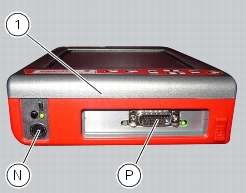
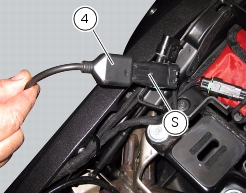
by connecting to the instrument's diagnosis connector (P) the power and diagnostic cable (4) part no. 97900.0227S; then connect the motorcycle DDA socket (S) to the connection socket of the power and diagnostic cable.
Note
For connection of the various devices required for self-diagnostic procedures, consult the instruction handbook supplied with the tester.
 
DDS diagnosis instrument
The main functions of the DDS diagnosis instrument can be summarised as follows:
-
-
-
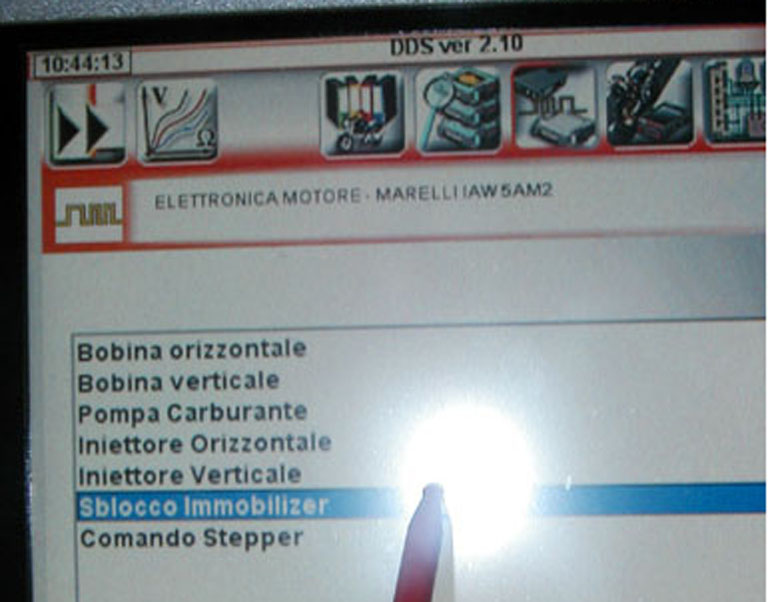
Active diagnostics. Activation of ignition-injection system transducers to test functionality and control signals (fuel pump, ignition coils, rev counter, injectors, etc.). With this function it is also possible to enter the code to override the immobilizer.
-
Road test. Allows the technician to store engine parameters recorded within a previously specified engine speed range interval. The resulting parameters can then be analysed and displayed once they have been acquired.
-
With specific sensors connected, the DDS diagnosis instrument can read electrical voltages, current, temperature, timing belt tension, and pressure values (lubrication and fuel supply circuits for example).
Checking and adjusting timing belt tension
Note
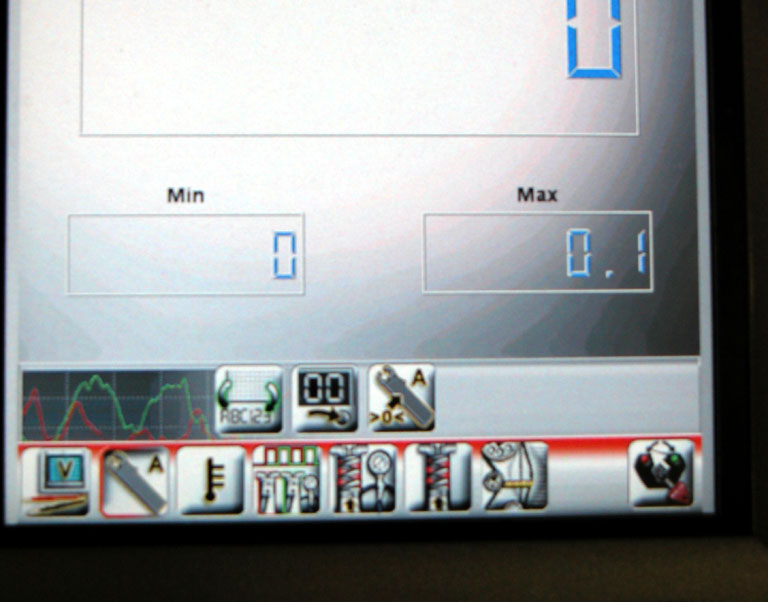
The on-screen icons used during this procedure are explained in a table at the end of this section.
Note
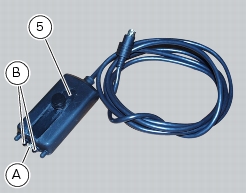
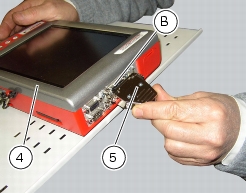
This operation, which is performed using the DDS diagnosis instrument, has the advantage that it can be carried out on both timing belts with the engine still installed on the frame. Connect an optical reader (5) to the DDS part no. 88765.1371. The optical reader has a green LED that serves to determine that the reader is correctly positioned in front of the belt to be tested. It is also equipped with an infrared transmitter (A) and receiver (B) designed to detect oscillations of the belt when caused to vibrate with the flick of a finger.
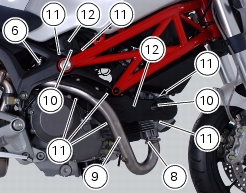
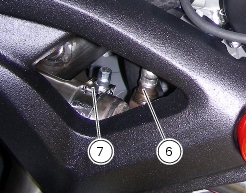
Unscrew the lambda sensor (6), undo the clamp (7), loosen nuts (8) and remove the exhaust pipe (9).
Remove the spark plug caps (10).
Unscrew the screws (11) and remove the side covers (12).
Remove the spark plugs.
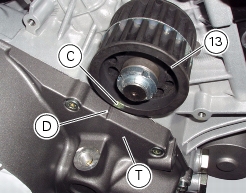
Position the crankshaft so that the piston of the horizontal cylinder is at TDC of its power stroke, using the whole tool.
This is achieved by aligning the timing mark (C) of the timing driveshaft pulley (13) with the reference notch (D) on the clutch cover (T).
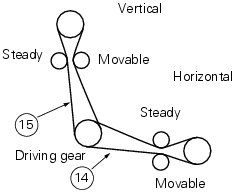
Measure the horizontal timing belt on the section (14) as described in the paragraph “Measuring timing belt tension”.
 
Turn the crankshaft through 270° in the direction of rotation of the engine (so that the vertical cylinder is at TDC of the power stroke) and repeat the procedure used for the horizontal cylinder, measuring the tension on section (15) of the vertical cylinder timing belt.
Remove the belt tension sensor and disconnect the DDS diagnosis instrument from the motorcycle.
Refit all the removed parts in the reverse order to that in which they were removed.
Measuring timing belt tension
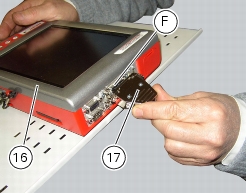
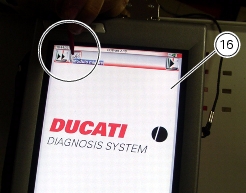
Switch on the DDS diagnosis instrument (16) tool part no. 97900.0215 as indicated in the paragraph “Tester power supply“.
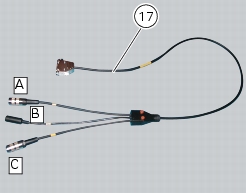
Connect the power and diagnostics cable (Measurement Module) (17) tool part no. 97900.0222 to the measurement module connector (F) on the DDS diagnosis instrument (16).
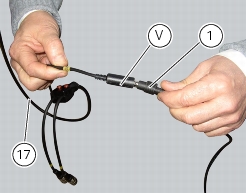
Connect the belt tension sensor (1) tool part no.88765.1371 to the jack (V) of the power supply and diagnosis cable (Measurement Module) (17) tool part no. 97900.0222.
 
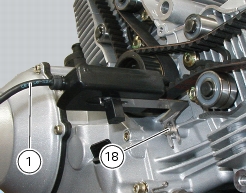
Fix the mounting bracket of the belt tension sensor (1) using the timing belt cover screw (18).
Direct the central green LED of the sensor (1) at the midpoint of the belt section, placing the sensor (1) parallel to the belt and at a distance of about 1÷1.5 cm from it.
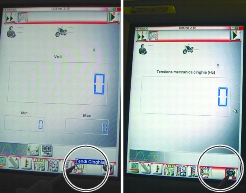
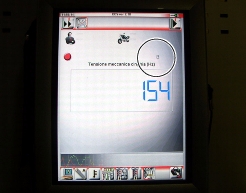
On the DDS diagnosis instrument (16), select the “Measurement module” function by pressing the corresponding icon; then press the “Belt Tension” icon followed by the “Start” icon to access the “Mechanical belt tension” screen.
The socket to which the cable (Measurement Module) (17) is to be connected is indicated on the screen with a capital letter: A, B or C.
Flick the belt lightly with your finger and read the frequency value (Hz) on the DDS diagnosis instrument.
Note
Do not stress the belt several times repeatedly, since the necessary minimum time for the DDS diagnosis instrument to take a reading is 1 second.
 
The tension values are those detailed in Sect. 3 - 1.1, Timing system/valves and must be checked when the engine is cold: apply the installation values when fitting a new belt, and the reset values when belt tension reaches 70 Hz.
Warning
The timing belts can become slack during normal operation. When checking belt tension, if the reading is less than 70 Hz, restore to the specified nominal values (Sect. 3 - 1.1, Timing system/valves).
 
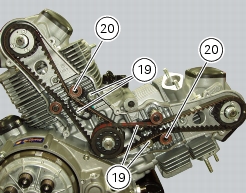
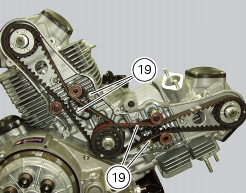
If the tension value is incorrect, tighten or slacken the belt by loosening the screws (19) and moving the tensioner pulleys.
Manually raise the tensioner pulley (20) to increase belt tension or lower it to reduce belt tension.
Recheck the timing belt tension.
Repeat the above procedure until the correct belt tension is obtained.
Once the desired tension is obtained, tighten the screws (19) to a torque of 26 Nm (Mim. 23 Nm - Max 29 Nm) (Sect. 3 - 3, Engine torque settings).
Self-adaptation of the throttle position sensor (TPS)
The linear throttle position sensor is mounted on the throttle body and cannot be adjusted. It is therefore necessary to teach the ECU the angle corresponding to the zero position of the position sensor itself, as follows.
Warning
This procedure must precede the first start-up of the vehicle after replacement of the throttle body, potentiometer or ECU.
 
Make sure the throttle valves are seated against the stop screws (throttle twistgrip released).
In this position you can teach the ECU the angle of the position sensor. To do this, use the DDS diagnosis instrument and follow the procedure described below.
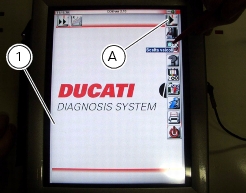
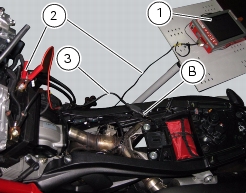
Switch on the DDS diagnosis instrument (1) tool part no. 97900.0215 as indicated in the paragraph “Tester power supply“.
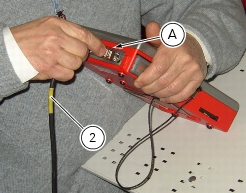
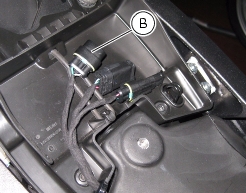
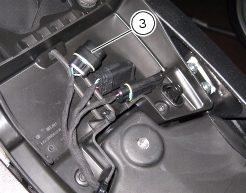
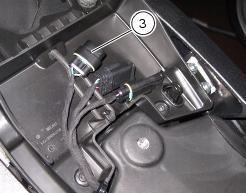
Connect the power and diagnostics cable (2) tool part no. 97900.0227S to the diagnostics connector (A) on the tester and to the diagnostics socket (B) under the seat.
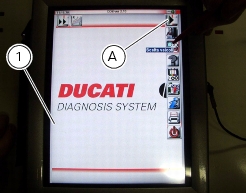
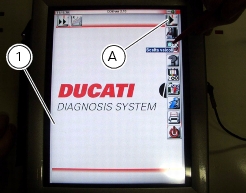
Enter the general functions menu by pressing the icon “Menu 1” (A).
Press the “Select vehicle” icon and, on the next screen, press the “Select motorcycle” icon; select the motorcycle model and confirm, then select the version and confirm.
Press the icon “Select system” to display a list of the bike’s systems that can be analysed.
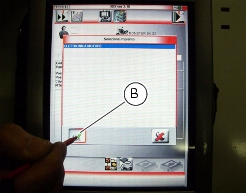
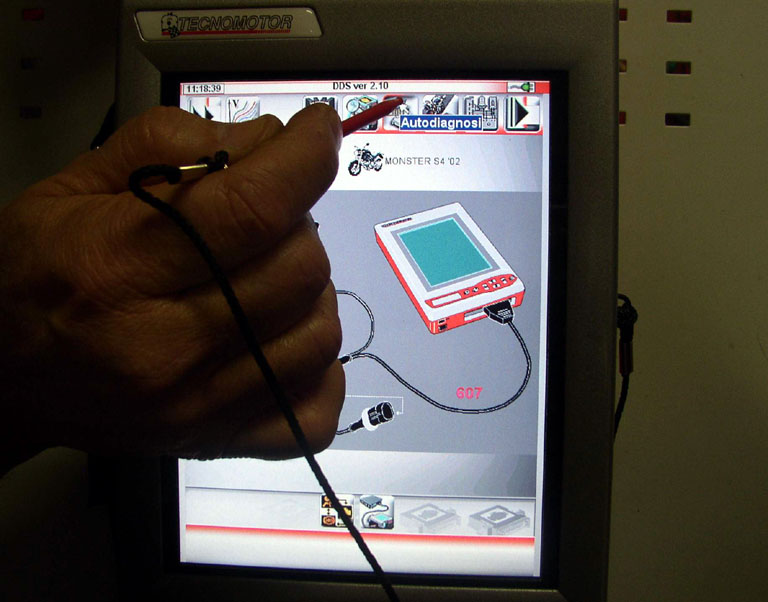
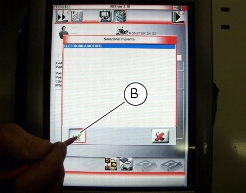
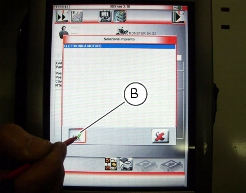
Select “Engine electronics” and press the “Confirm” icon (B). Next, press the “Self-diagnosis” icon to access the corresponding function.
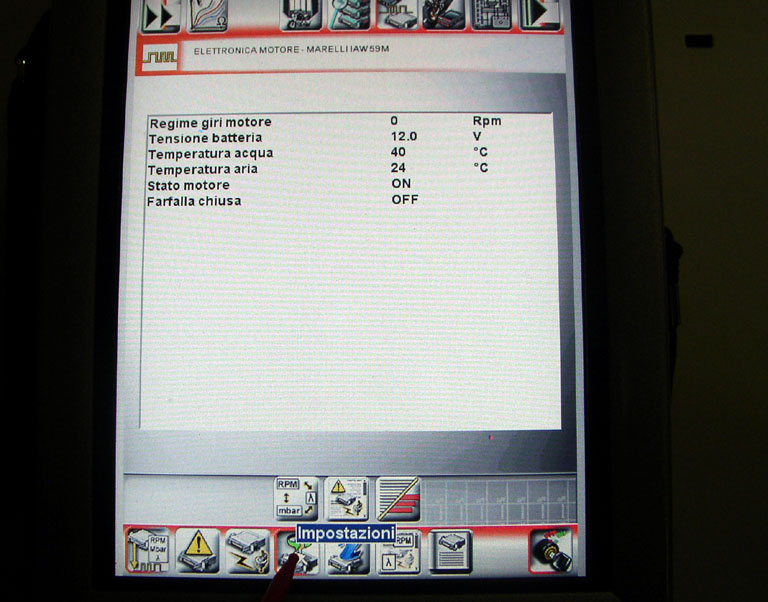
The DDS diagnosis instrument will interrogate the electronic control unit and display the parameters analysed with their relative values.
Note
Make all connections with the motorcycle ignition key in the OFF position.
 
Press the “Settings” icon to display the special parameters.
Select the option “Self-adaptation of the throttle position sensor (TPS)” and then press the icon “Apply”.
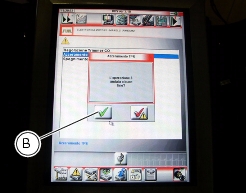
On completion of the operation, the message “Was the operation completed successfully?” will appear; press “Confirm” (B).
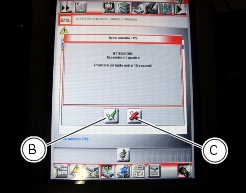
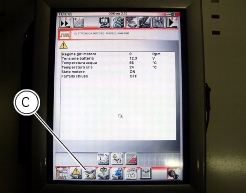
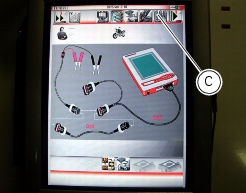
If any problems were encountered during the operation, the tester will display the relative error messages: each message must be confirmed (by pressing the “Confirm” icon (B)), or rejected (by pressing the “Exit” icon (C)).
Once the reset has been performed, the ECU will be associated with the motorcycle’s throttle body. Replacement of the throttle body, the throttle position sensor or the ECU must always be immediately followed by a new reset procedure.
Adjusting the idle speed
Note
Check that the motorcycle is fitted with a genuine Ducati ECU, intake system and exhaust system; if not, fit genuine components.
 
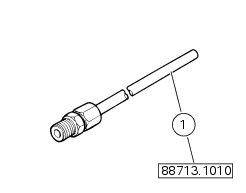
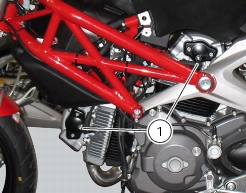
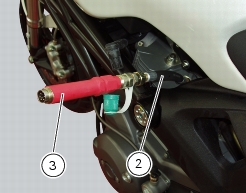
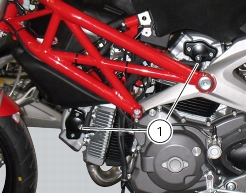
Connect the inserts of the exhaust gas analyser code 88713.1010 to the outlets on the exhaust pipes, using the fittings (1).
Connect the DDS and select MONSTER 796 / MONSTER 796 ABS.
Make sure that the throttle body pulley is seated against the stop screw when the throttle twistgrip is fully closed.
Make sure that the throttle cable free play is correctly adjusted.
Check:
-
Start the engine and wait for the engine temperature to reach 100 °C. When engine temperature reaches 100° C, start the following adjustment procedure.
 
Idle speed shall be between 1,250 and 1,350 rpm (1,300±50):
-
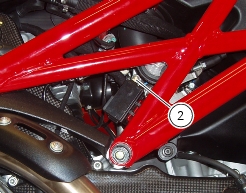
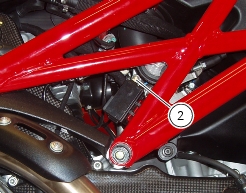
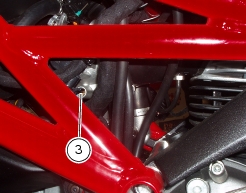
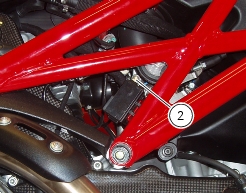
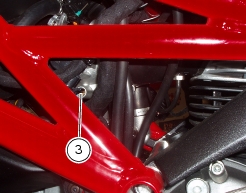
If idle speed is lower or higher than the specified values, open or close by 1/4 of a turn the by-pass screws (2) and (3) on both cylinders; once idle speed is fine, check that the CO rate is above 0.4% in both cylinders.
If idle speed setup procedure does not allow you to achieve the target value, proceed as follows:
 
-
-
-
 
Warning
If the engine is shut off before proceeding with adjustment of the CO level, wait three minutes after restarting for the enrichment phase to finish and the lambda sensors to start operating.
 
If idling rpm is too high and by-pass screws adjustment was not effective, make sure that parts below throttle are sealing correctly, in particular check for cracks or fissures in the intake manifolds make sure they are securely fastened to the engine, check for cuts in the pressure sensor hoses, etc.
 
Warning
Idle speed adjustment takes priority over balancing the vacuum pressures downstream of the butterfly valve. Differences in pressure between the horizontal and vertical cylinder are therefore acceptable, provided that the idle speed is adjusted correctly.
 
-
-
Throttle body balancing
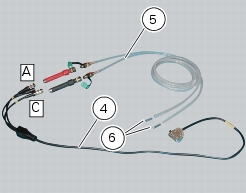
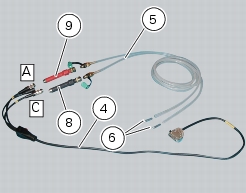
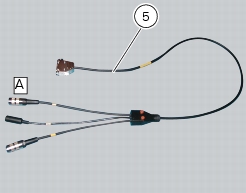
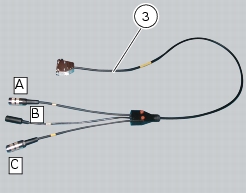
Connect the Measurement Module cable (4) tool part no. 97900.0222 to the DDS Measurement Module connector, as described in the paragraph “Description of the Ducati Diagnostic System tester“.
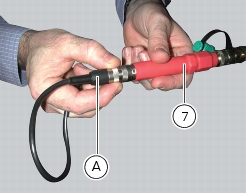
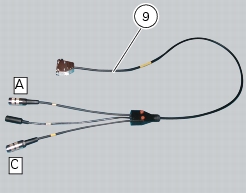
Connect the cable (4) connectors (A) and (C) to the depression/pressure pipes (5) part no. 97900.0220 and to the latter the fittings (6) part no. 97900.0221.
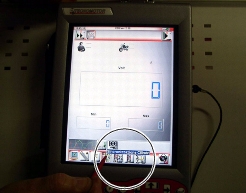
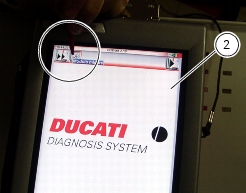
Turn on the DDS diagnosis instrument referring to the paragraph “Tester power supply”. Enter the “Measurement module” function. Press the “Cylinder synchronisation” icon.
The socket to which the Measurement Module cable (4) is to be connected is indicated on the screen with a capital letter: A, B or C.
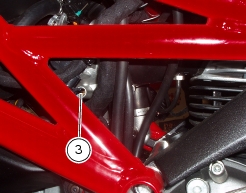
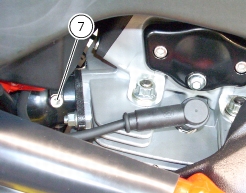
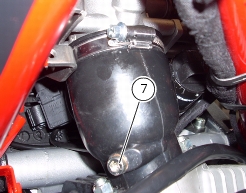
Remove the screws (7) on the intake manifolds and install the unions (1) part no. 88713.1010 in place of the removed screws.
Take both by-pass screws (2) and (3) one turn open, from fully closed position.
Warning
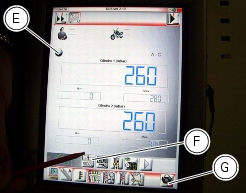
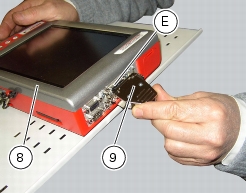
Press the “Reset“ icon (G), then connect the sensors (8) part no. 97900.0218 and (9) part no. 553.1.039.1A to the connectors (A) and (C) of the cable (3) and to the depression/pressure pipes (6).
 
Press the “Start” icon to begin the cylinder pressure measurement procedure.
The on-screen indicator light (E) will turn red when the function is active.
Start the bike.
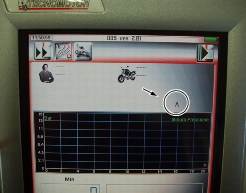
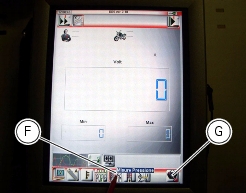
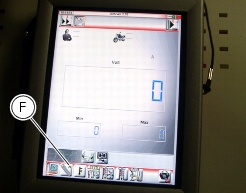
The values may be displayed in two different ways: in numerical form or in graphic form; to select the desired display type, press the “Value display” icon (F).
The values can be reset by pressing the “Reset” icon (G).
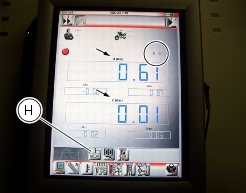
To adjust the balance (consider a tolerance between 260 and 270), turn the by-pass screws (2) and (3) until the two lines on the graph coincide, if in graphic mode, or until identical numerical values are displayed, if in numerical mode.
Balance is obtained when the two lines of the graph nearly coincide or when the two indicated values are within the tolerance range.
Check the engine oil pressure
Note
The on-screen icons used during this procedure are explained in a table at the end of this section.
 
To measure the pressure of the lubrication circuit, use the engine oil pressure test point (21) as described below.
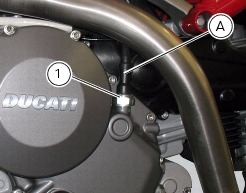
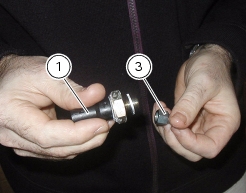
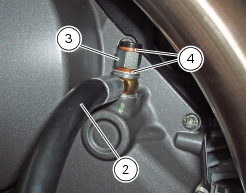
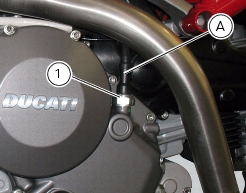
Disconnect the wiring connector (A) and remove the pressure switch (1), taking care to recover the seal.
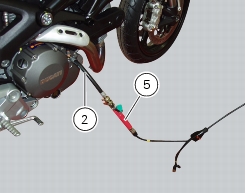
Introduce the fitting (3) part no. 814.1.114.1A into the connection on the hose (2) part no. 875.1.065.1A, placing two copper sealing washers in between (4). Screw the fitting (3) of the hose (2) into the threaded hole (M10x1 mm) in the RH cover fully home. Refit the pressure switch (1) on the fitting (3) along with its seal, and reconnect the wiring connector (A).
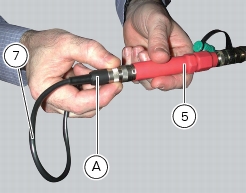
Connect the pressure sensor (5) part no. 552.1.039.1A to the pipe (2) to transform the pressure signal into an electrical signal.
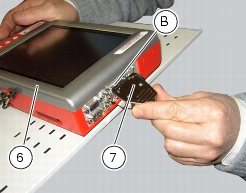
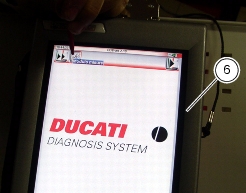
Switch on the DDS diagnosis instrument (6) part no. 97900.0215 as indicated in the paragraph “Tester power supply“.
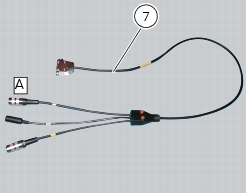
Connect the power and diagnostics cable (Measurement Module) (7) tool part no. 97900.0222 to the measurement module connector (B) on the DDS diagnosis instrument (6).
Connect the pressure sensor (5) to the socket (A) of the cable (7).
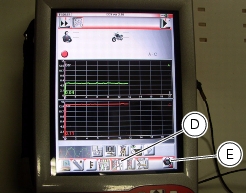
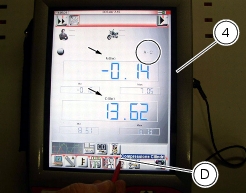
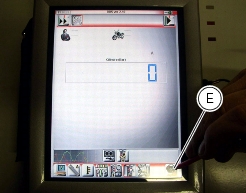
On the DDS diagnosis instrument (6), select the “Measurement module” function by pressing the corresponding icon; then press the “Pressure Test” icon (D) followed by the “Start” icon (E).
The letter A is displayed on the screen to indicate the connection socket of the Measurement Module cable (7).
Start the engine.
The values may be displayed in three different ways: in one numeric form and in two graphic forms; to select the desired display type, press the “Value display” icon.
The measured value is indicated alongside the letter (A) or (C) identifying the cable used for the measurement: i.e. if you used connector (A) of the cable (7), the value measured will displayed next to the letter (A) on the screen.
Oil pressure test values:
 
Warm engine
(Minimum oil temperature = 80 °C)
1,100÷1,300 rpm
greater than 0.8 bar.
3,500÷4,000 rpm
greater than 4 bar.
Important
The maximum pressure must never exceed 6.0 bar.
 
Excessively high pressure may indicate that the relief valve is stuck. Excessively low pressure, on the other hand, may be caused by the relief valve being stuck in the open position, the relief valve spring being too weak, or a faulty oil pump. Other causes are excessively worn seals and gaskets or a badly worn engine.
Remove the tool and refit the pressure switch (1) along with its seal. Secure it to a torque of 19 Nm (Min. 17 Nm - Max. 21 Nm) (Sect. 3 - 3, Engine torque settings).
Reconnect the electric system connector (A) to the pressure switch.
Disconnect the DDS diagnosis instrument.
Cylinder compression test
Note
The on-screen icons used during this procedure are explained in a table at the end of this section.
 
Engine performance is directly correlated to the pressure that can be measured in the combustion chambers of the two cylinders. Pressure which is too high/low or an excessive difference between the two cylinders will cause a drop in engine performance and can cause engine breakdowns.
Run the engine so that it warms up to the point that the fan is tripped at least once.
Remove the HT leads (1) from both spark plugs.
Remove the spark plug from the cylinder to be tested.
Position the HT lead carefully to avoid sparking.
Screw in the spark plug housing the cylinder compression cable (2) part no. 552.1.038.1A.
Connect the pressure sensors (3) part no. 552.1.039.1A to the cable (2).
Turn on the DDS diagnosis instrument (4) referring to the paragraph “Connection to the motorcycle”.
Connect the power and diagnostics cable (Measurement Module) (5) part no. 97900.0222 to the measurement module connector (B) on the DDS diagnosis instrument (4).
Connect the pressure sensor part no. 552.1.039.1A to the jack (A) of the cable (5) part no. 97900.0222.
Note
Measure the compression on one cylinder at a time.
On the DDS diagnosis instrument (4), select the “Measurement module” function by pressing the corresponding icon; then press the “Cylinder Compression” icon (D) followed by the “Start” icon (E).
The letter A is displayed on the screen to indicate the connector of the Measurement Module cable (3).
Open the throttles completely.
Turn over the engine with the starter motor until the pressure stops rising.
Check the pressure in each cylinder:
-
standard value: 11 to 12 bar;
-
-
An excessively high pressure value can be caused by:
-
An excessively low pressure value can be caused by:
-
-
-
-
-
 
Refit the spark plugs and reconnect the HT leads (1).
Fuel pressure test
Note
The on-screen icons used during this procedure are explained in a table at the end of this section.
 
In order to check the valve clearances, it is necessary to gain access to the four valve covers on the cylinder heads and then remove the parts listed below.
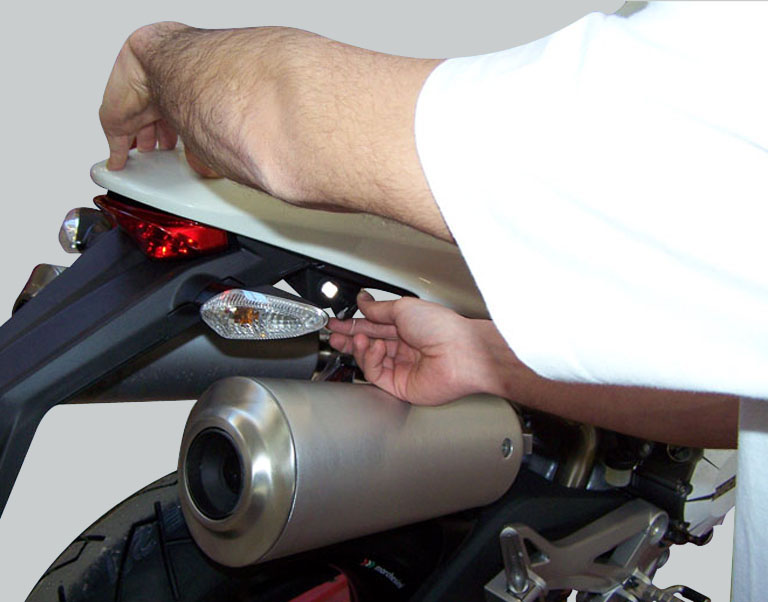
Open the lock and simultaneously apply downward pressure in the area of the catch to release the pin; Pull the seat backwards to release it from the front catches and remove it.
Remove the tank covers (Sect. 5 - 2, Removal of the fuel tank fairings).
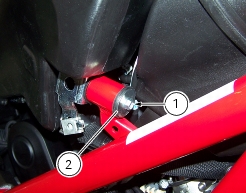
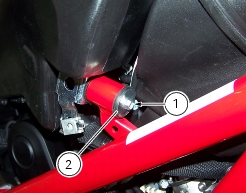
Unscrew the side screw (1) securing tank to the frame and recover the washer (2).
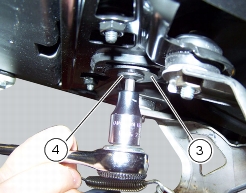
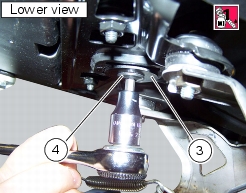
Unscrew the rear screw (3) securing tank and recover the washer (4).
Raise the tank but leave it connected to the fuel system and wiring then position it on the side, duly supported, to be able to work on the fuel system flange.
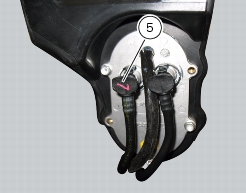
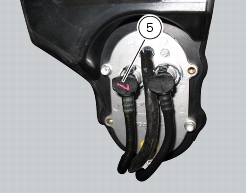
Remove the fuel feed hose (5).
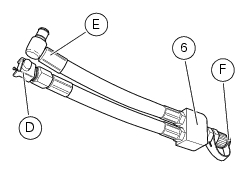
Use the fuel pressure pipe (6) part no. 590.1.189.1A connecting one end (D) to the coupling of the delivery pipe to the tank and the other end (E) to the fuel delivery pipe (5): in this way you create a pressure pick-up socket (F).
Connect the pressure sensor (7) part no. 552.1.039.1A to the pipe (6) jack (F) to transform the pressure signal into an electrical signal.
Turn on the DDS diagnosis instrument (8) referring to the paragraph “Tester power supply”.
Connect the power and diagnostics cable (Measurement Module) (9) part no. 97900.0222 to the measurement module connector (E) on the DDS diagnosis instrument (8).
Connect the pressure sensor (7) to socket (A) or (C) of the cable (9).
On the DDS diagnosis instrument, select the “Measurement module” function by pressing the “Measurement Module“ icon; then press the “Pressure Test” icon (F) followed by the “Start” icon (G).
The socket to which the cable (Measurement Module) (9) is to be connected is indicated on the screen with a capital letter: A, B or C.
The values may be displayed in three different ways: in one numeric form and in two graphic forms; to select the desired display type, press the “Value display” icon (H).
The measured value is indicated alongside the letter (A) or (C) identifying the cable used for the measurement: i.e. if you used connector (A) of the cable (3), the value measured will displayed next to the letter (A) on the screen.
The maximum pressure must be equal 3 bar (nominal).
On completion of the test, remove all the components of the test instrument, refit the fuel feed pipe (5) securing it with the clamp.
Refit all the removed parts in the reverse order to that in which they were removed.
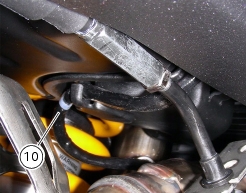
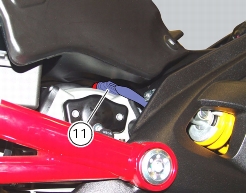
Refit the tank, ensuring to lay the lambda sensor cable (10) into the relevant tab on the tank flange cover and set the fuel pump connector (11) against the vertical head.
Secure the tank to the frame by fitting the screw (1) with washer (2) and tighten it to a torque of 10 Nm ±10% (Sect. 3 -  3, Frame torque settings).
Apply the recommended threadlocker to the screw (4).
Secure the tank to the subframe with the screw (4) and the washer (3).
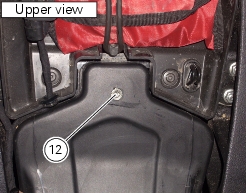
Tighten the screw (4) to a torque of 10 Nm ±10% (Sect. 3 - 3, Frame torque settings), using a 5 mm Allen wrench to counterhold the threaded insert (12) located on the upper part of the tank.
Important
The threaded insert (12) is not present in the USA version.
Refit the tank covers (Sect. 5 - 2, Refitting the fuel tank fairings).
Refit the seat inserting the front ends of the seat base into the tabs on the tank, then push the rear end of the seat until you hear the screw in the lock click into place.
 
Immobilizer override procedure
Note
The on-screen icons used during this procedure are explained in a table at the end of this section.
 
In the event of a malfunction of the immobilizer system, it is possible to start the engine using the emergency procedure described in Section 6 - 8, immobilizer and transponder, which requires a secret code that can be entered using the DDS diagnosis instrument.
Turn on the DDS diagnosis instrument (1) referring to the paragraph “Tester power supply”.
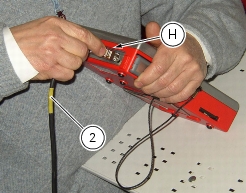
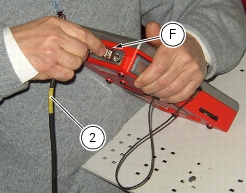
Connect the power and diagnostics cable (2) part no. 97900.0227S to the diagnostics connector (H) on the tester and to the diagnostics socket (3) on the motorcycle.
Enter the general functions menu by pressing the icon “Menu 1” (A).
Press the “Select vehicle” icon and, on the next screen, press the “Select motorcycle” icon; select the motorcycle model and confirm, then select the version and confirm.
Press the icon “Select system” to display a list of the bike’s systems that can be analysed.
Select “Engine electronics” and press the “Confirm” icon (B). Next, press the “Self-diagnosis” icon to access the corresponding function.
The DDS diagnosis instrument will interrogate the electronic control unit and display the parameters analysed with their relative values.
Note
Make all connections with the motorcycle ignition key in the OFF position.
Press the “Actuators” icon (C) to display the actuators and other components connected to the ECU.
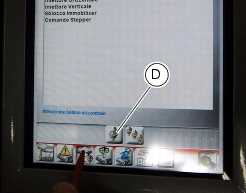
Select the option “immobilizer Override” and then press the icon “Apply” (D).
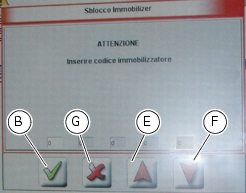
A screen will appear in which you can enter the 5 digit secret code. Use the red arrows (E) and (F) to enter each digit: after entering each digit, press the “Confirm” icon (B).
One the entire code has been entered, press the “Confirm” icon (B) again.
On completion of the operation, the message “Was the operation completed successfully?” will appear; press “Confirm”.
If any problems were encountered during the operation, the tester will display the relative error messages: each message must be confirmed by pressing the “Confirm” icon, or rejected by pressing the “Exit” icon (G).
Disconnect the tester.
Guided diagnosis
Note
The on-screen icons used during this procedure are explained in a table at the end of this section.
 
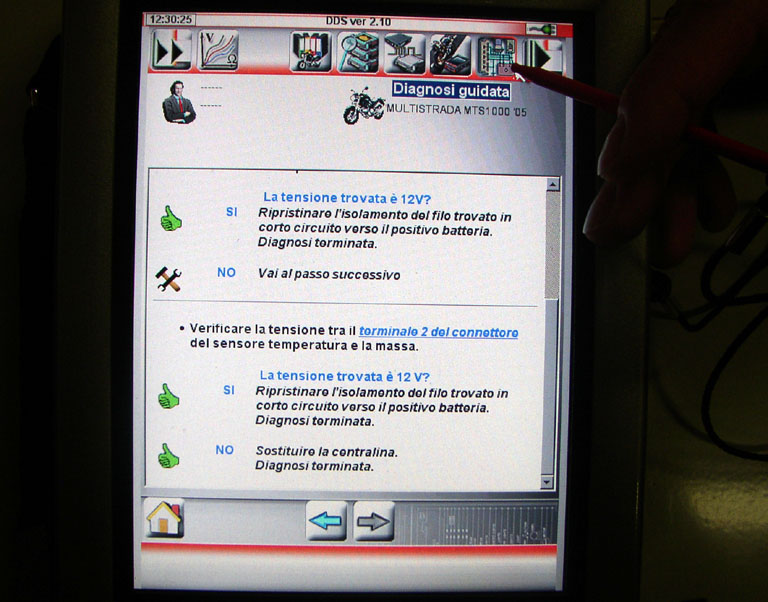
The DDS diagnosis instrument guides the operator step-by-step through the various diagnostic procedures, providing descriptions and documentation for motorcycle components, wiring diagrams for the electronic systems and information on the locations of specific components.
Turn on the DDS diagnosis instrument (1) referring to the paragraph “Tester power supply”.
Connect the power and diagnostics cable (2) part no. 97900.0227S and the diagnostics connector (F) to the diagnostics socket (3) on the motorcycle.
Enter the general functions menu by pressing the icon “Menu 1” (A).
Press the “Select vehicle” icon and, on the next screen, press the “Select motorcycle” icon; select the motorcycle model and confirm, then select the version and confirm.
Press the icon “Select system” to display a list of the bike’s systems that can be analysed.
Select “Engine electronics” and press the “Confirm” icon (B).
Press the “Guided diagnosis” icon (C) to access the corresponding function.
A series of screens are displayed indicating the operations required for correct diagnosis.
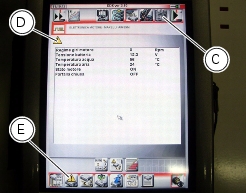
To determine whether the system has any internal problems, you can access the “Self-diagnosis” function by pressing the corresponding icon. If any errors are present, the symbol (D) will be displayed. To determine the type of errors present, press the “Errors” icon (E). Once errors have been detected, you can then resolve them through the guided diagnosis procedure; the “Guided Diagnosis” icon (C).
The DDS diagnosis instrument will interrogate the electronic control unit and display the parameters analysed with their relative values.
Testing the battery charging system
Note
The on-screen icons used during this procedure are explained in a table at the end of this section.
 
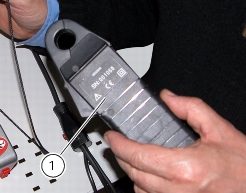
You can determine the engine rpm required for generator to produce just enough current to charge battery, feed the injection ignition system and all electric items fitted to motorcycle. When applied to a cable, the clamp-type amperemeter (1) part no. 88765.1126V detects the magnetic field generated by the current passing through that cable.
Remove the seat (Sect. 5 - 3, Removal of the seat).
Remove the tank covers (Sect. 5 - 2, Removal of the fuel tank fairings).
Remove the fuel tank (Sect. 8 - 2, Removal of the fuel tank).
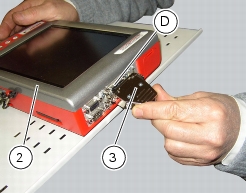
Turn on the DDS diagnosis instrument (2) referring to the paragraph “Tester power supply”.
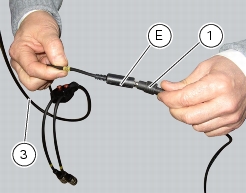
Connect the power and diagnostics cable (Measurement Module) (3) part no. 97900.0222 to the measurement module connector (D) on the DDS diagnosis instrument (1).
Connect the clamp-type amperemeter (1) to the connector (E) of the power and diagnostics cable (Measurement Module) (3).
Warning
The clamp-type amperemeter must not be connected to wires through which electrical current is flowing.
 
Insert the clamp-type amperemeter into the battery positive terminal lead with the arrow on the clamp pointing towards the battery positive terminal (+).
On the DDS diagnosis instrument (2), select the “Measurement module” function by pressing the corresponding icon; then press the “Ammeter” icon (F) followed by the “Start” icon.
The socket to which the cable (Measurement Module) (3) is to be connected is indicated on the screen with a capital letter: A, B or C.
If the measured current is a positive quantity, it means that generator is feeding all electric items and charging battery at the same time. If the current has a negative sign, this means that the charging system is not able to power the electrical loads and a significant amount of the current required must be supplied by the battery, which is therefore discharging.
Important
If polarity is reversed when clamping the ammeter onto the cable, the sign of the readings will also be reversed, giving rise to incorrect diagnosis.
ABS diagnosis
Note
The on-screen icons used during this procedure are explained in a table at the end of this section.
 
If the ABS system is not working correctly, system diagnosis is possible through the DDS diagnosis instrument.
Turn on the DDS diagnosis instrument (1) referring to the paragraph “Tester power supply”: use the power cord (2) part no. 97900.0230.
Connect the power supply cable (3) part no.97900.0227 tot he power cord (2) part no. 97900.0230 and to the ABS diagnosis connector (B) on the frame.
Icons table
 
Menu 1